# React Native Checkout SDK
import { Aside, Tabs, TabItem } from '@astrojs/starlight/components';
import Image from '@components/content/Image.astro';
SumUp's React Native Payment SDK provides a payment sheet that is displayed on top of your app. It collects user payment details, confirms a payment, and saves a card for future usage. Moreover, it allows a user to use Apple Pay or Google Pay to process payments.
## Integration
### Before You Begin
Here are the things that you need in order to complete the steps in this guide:
- You have a merchant account with [SumUp](https://me.sumup.com/login) and have already filled in your [account details](https://me.sumup.com/account).
- For a **sandbox merchant account** reach out to our support team through this [contact form](/contact).
- You have [registered your client application](/tools/authorization/oauth/#register-an-oauth-application) with SumUp.
- You have a valid access token obtained via the [Authorization code flow](/tools/authorization/oauth/#authorization-code-flow).
- The restricted `payment_instruments` scope is enabled for your client application. If it isn't enabled, [contact us](/contact) and request it.
- Review the [single payment guide](https://developer.sumup.com/online-payments/guides/single-payment/#before-you-begin).
### Create a Checkout
Initializing the SDK works by passing it a `checkout_id`. To [create a checkout](/api/checkouts/create) on your backend make the following request:
```bash
curl --request POST \
--url https://api.sumup.com/v0.1/checkouts \
--header "Authorization: Bearer $SUMUP_API_KEY" \
--header 'Content-Type: application/json' \
--data '{
"checkout_reference": "44ea5096-b83f-46e1-9323-fe82a8cb7eb5",
"currency": "SEK",
"amount": 9.99,
"description": "Order #1234",
"merchant_code": "MXXXXXXX",
"return_url": "https://example.com",
"redirect_url": "https://sumup.com"
}'
```
```ts
const checkout = await client.checkouts.create({
checkout_reference: "44ea5096-b83f-46e1-9323-fe82a8cb7eb5",
amount: 9.99,
currency: "SEK",
merchant_code: "MXXXXXXX",
description: "Order #1234",
return_url: "https://example.com",
redirect_url: "https://sumup.com",
});
```
```csharp
var checkout = await client.Checkouts.CreateAsync(new CheckoutCreateRequest
{
CheckoutReference = "44ea5096-b83f-46e1-9323-fe82a8cb7eb5",
Amount = 9.99f,
Currency = Currency.Sek,
MerchantCode = "MXXXXXXX",
Description = "Order #1234",
ReturnUrl = "https://example.com",
RedirectUrl = "https://sumup.com",
});
```
```java
var checkout = client.checkouts().createCheckout(
CheckoutCreateRequest.builder()
.checkoutReference("44ea5096-b83f-46e1-9323-fe82a8cb7eb5")
.amount(9.99f)
.currency(Currency.SEK)
.merchantCode("MXXXXXXX")
.description("Order #1234")
.returnUrl("https://example.com")
.redirectUrl("https://sumup.com")
.build()
);
```
```go
description := "Order #1234"
returnURL := "https://example.com"
redirectURL := "https://sumup.com"
checkout, err := client.Checkouts.Create(ctx, sumup.CheckoutsCreateParams{
CheckoutReference: "44ea5096-b83f-46e1-9323-fe82a8cb7eb5",
Amount: 9.99,
Currency: sumup.CurrencySEK,
MerchantCode: "MXXXXXXX",
Description: &description,
ReturnURL: &returnURL,
RedirectURL: &redirectURL,
})
```
```py
from sumup.checkouts.resource import CreateCheckoutBody
checkout = client.checkouts.create(
CreateCheckoutBody(
checkout_reference="44ea5096-b83f-46e1-9323-fe82a8cb7eb5",
amount=9.99,
currency="SEK",
merchant_code="MXXXXXXX",
description="Order #1234",
return_url="https://example.com",
redirect_url="https://sumup.com",
)
)
```
```rust
let checkout = client
.checkouts()
.create(Some(sumup::resources::checkouts::CheckoutCreateRequest {
checkout_reference: "44ea5096-b83f-46e1-9323-fe82a8cb7eb5".into(),
amount: 9.99,
currency: sumup::resources::checkouts::Currency::SEK,
merchant_code: "MXXXXXXX".into(),
description: Some("Order #1234".into()),
return_url: Some("https://example.com".into()),
redirect_url: Some("https://sumup.com".into()),
customer_id: None,
purpose: None,
id: None,
status: None,
date: None,
valid_until: None,
transactions: None,
}))
.await?;
```
```php
$checkout = $sumup->checkouts->create([
'checkout_reference' => '44ea5096-b83f-46e1-9323-fe82a8cb7eb5',
'currency' => 'SEK',
'amount' => 9.99,
'description' => 'Order #1234',
'merchant_code' => 'MXXXXXXX',
'return_url' => 'https://example.com',
'redirect_url' => 'https://sumup.com',
]);
```
The SDK will process the checkout once a customer provides payment details. If payment details aren't passed an error will be received.
## Set up SDK
Install the npm module by one of the following commands:
```bash
npm i sumup-react-native-alpha
npm i react-native-webview
```
```bash
yarn add sumup-react-native-alpha
yarn add react-native-webview
```
You need to install `react-native-localization` to automatically detect the user system language.
```bash
npm i react-native-localization
```
```bash
yarn add react-native-localization
```
If you don't need it, please provide the language field in the `initPaymentSheet` function.
```javascript
await initPaymentSheet({
checkoutId,
language: 'en',
});
```
Next, install the native modules.
```bash
cd ios
pod install
```
SDK should be initialized by wrapping your payment screen into SumUpProvider. This component requires an `apiKey` you can create in the [API Keys settings](/tools/authorization/api-keys/).
```javascript
import { SumUpProvider } from 'sumup-react-native-alpha';
export default function App() {
return (
);
}
```
## Provide Payment Details
Before showing the payment sheet, it needs to be initialized. Call `initPaymentSheet` with the parameters like in example below:
```js
import React, { useEffect } from "react";
import { View, Alert } from "react-native";
import { useSumUp } from "sumup-react-native-alpha";
export default function MainScreen() {
const { initPaymentSheet } = useSumUp();
const initSumUpPaymentSheet = async () => {
const { error } = await initPaymentSheet({
checkoutId: "...",
customerId: "...",
language: "en", // en or sv are supported
});
if (error) {
Alert.alert(
error.status,
error.status === "failure" ? error.message : undefined
);
} else {
Alert.alert("Payment Sheet was configured");
}
};
useEffect(() => {
initSumUpPaymentSheet();
}, []);
...
```
**Required** fields for `initPaymentSheet`:
- `checkoutId` - described in section [Create a checkout](/online-payments/sdks/react-native/#create-a-checkout).
*Optional*:
- `customerId` - used for saving cards for future usage.
- `language` - English and Sweden are supported (if undefined, react-native-localization will be used to check user device language).
## Show Payment Sheet
After initialization a payment sheet can be shown. When a user presses a button, you can show it by calling `presentPaymentSheet()`. After a user completes a payment, this function will return a callback. If any errors take place, the callback will contain an error field with the details.
```js
...
const showPaymentSheet = async () => {
const { error } = await presentPaymentSheet();
if (error) {
Alert.alert(
error.status,
error.status === "failure" ? error.message : undefined
);
} else {
Alert.alert("Payment successfully was processed");
}
};
return (
);
}
```
## Optional Integrations
### Save a Card for Future Usage
To save a card for future usage, a customer should be created. It can be achieved by making the following request:
```bash
curl -L -X POST 'https://api.sumup.com/v0.1/customers' \
-H 'Content-Type: application/json' \
-H 'Accept: application/json' \
-H "Authorization: Bearer $SUMUP_API_KEY" \
--data-raw '{
"customer_id": "831ff8d4cd5958ab5670",
"personal_details": {
"first_name": "John",
"last_name": "Doe",
"email": "user@example.com",
"phone": "+491635559723",
"birthdate": "1993-12-31",
"address": {
"city": "Berlin",
"country": "DE",
"line1": "Sample street",
"line2": "ap. 5",
"postal_code": "10115",
"state": "Berlin"
}
}
}'
```
```ts
const customer = await client.customers.create({
customer_id: "831ff8d4cd5958ab5670",
personal_details: {
first_name: "John",
last_name: "Doe",
email: "user@example.com",
phone: "+491635559723",
birth_date: "1993-12-31",
address: {
city: "Berlin",
state: "Berlin",
country: "DE",
line_1: "Sample street",
line_2: "ap. 5",
postal_code: "10115",
},
},
});
```
```csharp
var customer = await client.Customers.CreateAsync(new Customer
{
CustomerId = "831ff8d4cd5958ab5670",
PersonalDetails = new PersonalDetails
{
FirstName = "John",
LastName = "Doe",
Email = "user@example.com",
Phone = "+491635559723",
BirthDate = new System.DateTime(1993, 12, 31),
Address = new AddressLegacy
{
City = "Berlin",
State = "Berlin",
Country = "DE",
Line1 = "Sample street",
Line2 = "ap. 5",
PostalCode = "10115",
},
},
});
```
```java
var customer = client.customers().createCustomer(
Customer.builder()
.customerId("831ff8d4cd5958ab5670")
.personalDetails(
PersonalDetails.builder()
.firstName("John")
.lastName("Doe")
.email("user@example.com")
.phone("+491635559723")
.birthDate(java.time.LocalDate.parse("1993-12-31"))
.address(
AddressLegacy.builder()
.city("Berlin")
.state("Berlin")
.country("DE")
.line1("Sample street")
.line2("ap. 5")
.postalCode("10115")
.build()
)
.build()
)
.build()
);
```
```go
str := func(v string) *string { return &v }
customer, err := client.Customers.Create(ctx, sumup.CustomersCreateParams{
CustomerID: "831ff8d4cd5958ab5670",
PersonalDetails: &sumup.PersonalDetails{
FirstName: str("John"),
LastName: str("Doe"),
Email: str("user@example.com"),
Phone: str("+491635559723"),
Address: &sumup.AddressLegacy{
City: str("Berlin"),
State: str("Berlin"),
Country: str("DE"),
Line1: str("Sample street"),
Line2: str("ap. 5"),
PostalCode: str("10115"),
},
},
})
```
```py
from sumup.customers.resource import CreateCustomerBody
from sumup.customers.types import AddressLegacy, PersonalDetails
customer = client.customers.create(
CreateCustomerBody(
customer_id="831ff8d4cd5958ab5670",
personal_details=PersonalDetails(
first_name="John",
last_name="Doe",
email="user@example.com",
phone="+491635559723",
birth_date="1993-12-31",
address=AddressLegacy(
city="Berlin",
state="Berlin",
country="DE",
line_1="Sample street",
line_2="ap. 5",
postal_code="10115",
),
),
)
)
```
```rust
let customer = client
.customers()
.create(sumup::resources::customers::Customer {
customer_id: "831ff8d4cd5958ab5670".into(),
personal_details: Some(sumup::resources::common::PersonalDetails {
first_name: Some("John".into()),
last_name: Some("Doe".into()),
email: Some("user@example.com".into()),
phone: Some("+491635559723".into()),
birth_date: None,
tax_id: None,
address: Some(sumup::resources::common::AddressLegacy {
city: Some("Berlin".into()),
state: Some("Berlin".into()),
country: Some("DE".into()),
line_1: Some("Sample street".into()),
line_2: Some("ap. 5".into()),
postal_code: Some("10115".into()),
}),
}),
})
.await?;
```
```php
$customer = $sumup->customers->create([
'customer_id' => '831ff8d4cd5958ab5670',
'personal_details' => [
'first_name' => 'John',
'last_name' => 'Doe',
'email' => 'user@example.com',
'phone' => '+491635559723',
'address' => [
'city' => 'Berlin',
'state' => 'Berlin',
'country' => 'DE',
'line_1' => 'Sample street',
'line_2' => 'ap. 5',
'postal_code' => '10115',
],
],
]);
```
For more information on saving a customer refer to [this guide](/api/customers/create).
To use the newly created customer, create a checkout by passing the `customer_id` and provide it to the `initPaymentSheet` function.
```js
await initPaymentSheet({
// ...
customerId: '...',
});
```
### Use Google Pay
To use Google Pay, first enable the Google Pay API by adding the following to the `application` tag of your `AndroidManifest.xml`:
```bash
...
```
For more details, see [Google Pay’s Set up Google Pay API for Android](https://developers.google.com/pay/api/android/guides/setup).
Then provide `googlePay` object to the `initPaymentSheet` to initialize.
```js
await initPaymentSheet({
// ...
googlePay: {
isProductionEnvironment: false,
},
});
```
### Use Apple Pay
#### Register for an Apple Merchant ID
Obtain an Apple Merchant ID by registering for a new identifier on the Apple Developer website. Fill out the form with a description and identifier. Your description is for your own records and you can modify it in the future.
**Create a new Apple Pay certificate - needs to be implemented.**
To enable Apple Pay in Xcode:
1. Open your target settings
2. Go to Signing & Capabilities tab
3. Click on Add Capability button
4. Select your merchant identifier
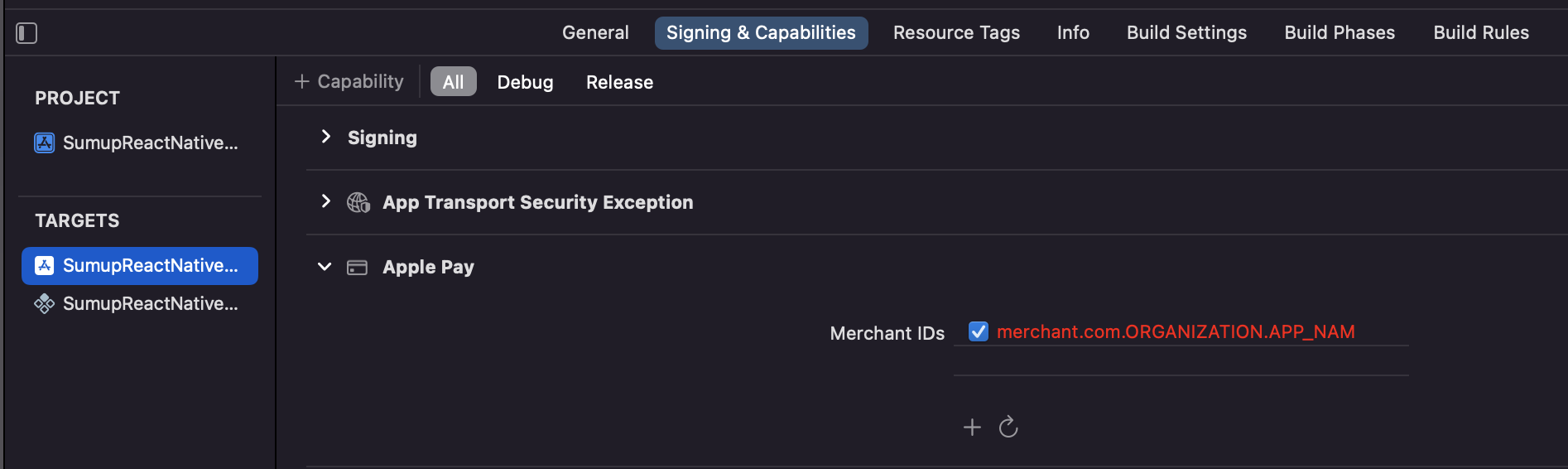
Then provide an `applePay` object in `initPaymentSheet` to initialize.
```js
await initPaymentSheet({
// ...
applePay: {
merchantIdentifier: 'merchant.com.{{YOUR_APP_NAME}}',
label: 'Pay',
},
});
```